
CMYK vs. RGB: why your printed colors look different from your screen
Screens create color with light (RGB), while printers mix ink (CMYK). Some bright RGB colors cannot be printed exactly, so design in CMYK and request a proof when color is critical.
One of the most common questions we hear is: “Why does my print look different from my screen?” The answer is simple physics. Screens glow; paper reflects.
RGB: color from light
Screens mix red, green and blue light. Because they emit light, they can show very bright and saturated colors, including neon tones that look electric.
CMYK: color from ink
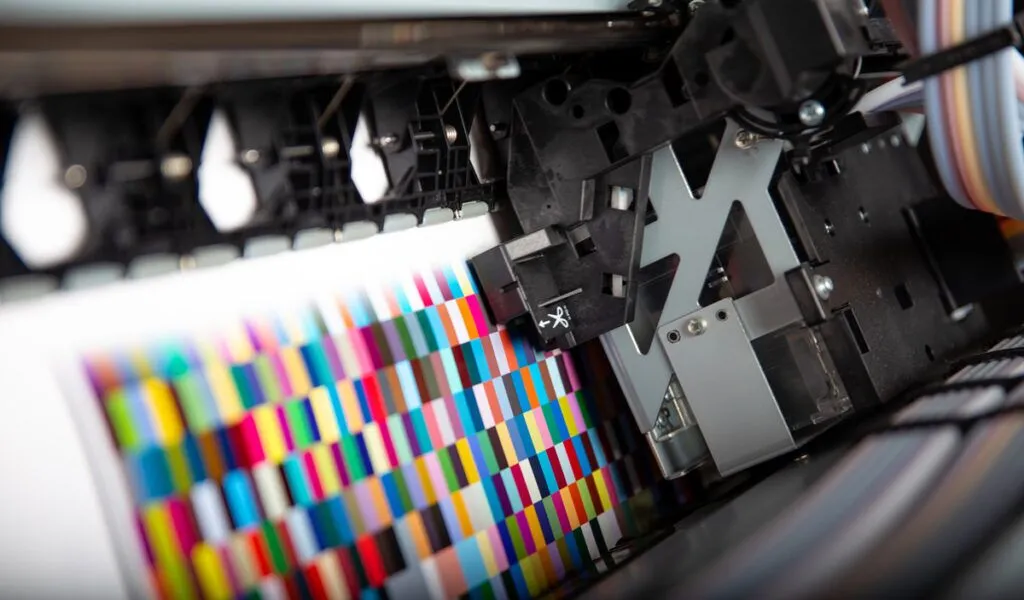
Printers combine cyan, magenta, yellow and black ink on paper. Paper reflects light instead of emitting it, so the range of colors is smaller, and very bright RGB colors turn out slightly duller.
How to avoid surprises
Set your document to CMYK from the beginning so the preview is closer to reality. Avoid relying on neon or ultra-bright colors for important elements, and keep in mind that screens vary in brightness and calibration.
- Design in CMYK for print projects.
- Send us brand color references when exact color matters.
- Ask for a physical proof for critical color work.
Paper changes color too
The same ink looks different on glossy, matte and uncoated paper. Gloss keeps colors vivid, while uncoated paper absorbs ink and looks softer.

Design in CMYK, expect slightly softer bright colors on paper and ask for a proof when color accuracy matters.
Discount Printing Team
Frequently asked questions
Can I send RGB files for printing?
Yes, but colors will be converted to CMYK, which can change bright tones. Sending CMYK files gives you a more accurate preview.
What is a rich black?
A rich black mixes several inks to look deeper than plain black. Ask us whether it is recommended for your large black areas.
Can you match my brand color?
We will match it as closely as possible. Send a color reference, and ask for a proof if exact color is important.
Need printing for your project?
Tell us what you need and we will prepare a no-obligation quote. Call (954) 709-8309, email sales@discountprintinggroup.com or send us a message. You can also visit our shop at 1249 Stirling Rd Store #10, Dania Beach, FL 33004.


Ready to start your order?
Get a no-obligation quote from our print shop in Dania Beach.